Best Compact Laptop Stand for Programmers

Five compact laptop stands compared for programmers who move between desks, meeting rooms and coffee shops. The winner folds thinner than a phone.

By Aidyn MeadowsUpdated 15 min read
On this page
- Best compact laptop stand for programmers at a glance
- What actually decides this for a programmer
- How I screened the field down to five
- 1. Tonmom 104S Laptop Stand — Best overall
- 2. Gogoonike Adjustable Laptop Stand — Best budget pick
- 3. BESIGN LS03 Aluminum Laptop Stand — Best upgrade
- 4. OMOTON LA10 360° Rotating Laptop Stand — Best premium
- 5. SODI Ultra Compact Bi-Fold Stand — Best warranty
- Fold-flat wedge or A-frame riser: which suits your workflow?
- Will a compact stand really hold a 15.6-inch laptop steady?
- What the listings do not tell you about coding posture
- The verdict
- FAQ
The best compact laptop stand for programmers is the Tonmom 104S, a 0.57 lb wedge that folds to 0.92 x 10.5 x 1.96 in and steps through seven heights from 2.78 to 6.5 in. If you code at a fixed desk with an external keyboard, the BESIGN LS03 lifts the screen a full 6 in on an aluminium A-frame instead, and it is the sturdier pick when the stand never leaves the desk.
Best compact laptop stand for programmers at a glance
| Pick | Folded thickness | Height range | Price |
|---|---|---|---|
Best overall Tonmom 104S Laptop Stand |
0.92 in | 2.78 – 6.5 in (7 levels) | Check Price |
Best budget pick Gogoonike Adjustable Laptop Stand |
0.83 in | 4.34 – 6.59 in (6 levels) | Check Price |
Best upgrade BESIGN LS03 Aluminum Laptop Stand |
5.71 x 10.2 x 9.45 in (assembled) | 6 in lift (fixed claim) | Check Price |
Best premium OMOTON LA10 360° Rotating Stand |
1.81 in | Tool-free tilt, 360° swivel | Check Price |
Best warranty SODI Bi-Fold Ultra Compact Stand |
0.83 in | 6 levels (claim) | Check Price |


What actually decides this for a programmer
Most guides to the best compact laptop stand for programmers rank by lift height. That is not what decides it. Height only matters after the stand is on the desk, and the stand only reaches the desk if you were willing to carry it. Programmers move between a home desk, a shared office, a client site and, often, a cafe table shaped for a coffee cup and a saucer. The stand that stays in your bag forever is worthless at any lift.
The deciding specification is folded thickness. Under an inch and the stand slides into a laptop sleeve next to the machine. Over an inch and it starts to compete with a charger and a notebook for the second pocket. Two of the five picks here fold under 0.92 in. One of them, the SODI 314, folds to 0.83 in and 5 in long, small enough that "compact" understates it.
The second criterion is height range, not top height. A programmer who alternates between typing on the laptop keyboard and typing on an external one needs a low setting for the first and a high setting for the second. Seven steps beats six. A fixed 6 in lift, like the BESIGN LS03 claims, is only right if you always use an external keyboard.
Note on the keyword: "for programmers" is a use case, not a certified feature. No listing here declares itself a coding stand. What the data supports is which of these compact stands travels best, holds a 15.6-inch machine and steps through the heights a long coding day actually needs.
How I screened the field down to five
I compared the published specifications side by side across every compact laptop stand in the category, then cut anything that would not survive a programmer's week.
Three disqualifiers did most of the work:
- Anything that does not fold flat. A monitor-style riser is not compact, no matter what the listing calls it. The BESIGN LS03 survived on a detachable-design exception because it breaks down into flat pieces.
- Anything over 2 lb. A programmer will not carry a two-pound accessory to a cafe twice. The heaviest survivor is the OMOTON LA10 at 1.65 lb, and it earns its weight with the 360° rotation.
- Anything with a top height under 6 in. Below that you are still craning at the screen with an external keyboard, and the stand fails at its main job.
What survived splits cleanly into two shapes. Three are fold-flat wedges: the Tonmom 104S, the Gogoonike 103S and the SODI 314. Two are A-frame risers with more presence on the desk: the BESIGN LS03 and the OMOTON LA10. Every survivor claims compatibility with 10 to 15.6-inch laptops, and the SODI extends that to 16 in.
1. Tonmom 104S Laptop Stand — Best overall
A 0.57 lb wedge that folds to under an inch and still climbs to 6.5 in, which is the whole job for a programmer who moves.
Best for: programmers who hot-desk between home, office and cafe Skip it if: you leave the stand on one desk and never move it
The Tonmom 104S wins on the metric that decides this category: folded footprint. At 0.92 x 10.5 x 1.96 in it is the thinnest survivor once folded flat, and 0.57 lb is light enough that you forget it is in the bag. Seven height levels from 2.78 to 6.5 in cover both use cases in a coding day: a low tilt when you are typing on the built-in keyboard and hitting a debugger, and the top setting when the external keyboard comes out for a long session.
Tonmom says the triangle support and silicone pads keep the laptop planted, and the forward tilt with an open design vents heat rather than trapping it against a desk. Both matter when a compile job runs the fans for ten minutes straight. The 1-year warranty is stated, if terse.
The trade-off is honest. A wedge like this props the back of the laptop up and leaves the front resting on the desk, so it lifts the screen but not the keyboard. If you never use an external keyboard, an A-frame like the BESIGN gives a cleaner ergonomic line. And this is the second-cheapest of the five, not the cheapest.
Pros:
- Folds to 0.92 in thickness, fits a laptop sleeve
- Seven height steps from 2.78 to 6.5 in
- Only 0.57 lb, near-invisible in a bag
- Silicone pads and triangle bracing on both ends
- Stated 1-year warranty
Cons:
- Lifts the screen but keeps the keyboard on the desk
- Manufacturer claims are not independently verified
- Only one seller lists it, so stock can wobble
2. Gogoonike Adjustable Laptop Stand — Best budget pick
The cheapest of the five, 7.05 oz, and 0.83 in folded, which is thinner than the winner.

Best for: a first stand for a second bag or a side setup Skip it if: you need a published warranty for a work purchase
The Gogoonike 103S is the entry point into this shape. It is the cheapest pick here, and physically it is very close to the Tonmom: 7.05 oz, 0.83 x 9.8 x 1.7 in folded, six height levels from 4.34 to 6.59 in. On the desk you would struggle to tell the two apart, and the same silicone pads and triangle bracing story is repeated in the listing.
Two differences push it below the Tonmom for a programmer's main bag. The lowest step here is 4.34 in, not 2.78 in, so the "typing on the laptop keyboard" position is more tilted than some coders like. And no warranty is stated at all, where the Tonmom publishes one year. For a work-expensed accessory, that gap matters.
Where it earns its place is as a spare. Leave it in a second bag, keep it at a co-working desk, or hand it to a teammate who is finally admitting the neck ache is from the laptop. At this price you can afford a duplicate of your travel setup.
Pros:
- Cheapest of the five picks here
- 7.05 oz travel weight
- Six-level height adjustment
- Fold thickness of 0.83 in
- Compatible with 10 to 15.6-inch laptops
Cons:
- No warranty stated in the listing
- Lowest height step is 4.34 in, more tilted than the Tonmom
- Only one seller lists it
3. BESIGN LS03 Aluminum Laptop Stand — Best upgrade
A 1.54 lb aluminium A-frame that lifts the screen a full 6 in and sells faster than the rest of this set.

Best for: a fixed home desk paired with an external keyboard Skip it if: you carry the stand in a laptop sleeve every day
The BESIGN LS03 is a different animal from the wedges. It is an aluminium A-frame that assembles in three steps and, at 5.71 x 10.2 x 9.45 in on the desk, occupies real space. In return it lifts the whole laptop 6 in, clearing room for an external keyboard underneath. For a programmer who has settled into a home desk and stopped moving daily, that is the correct ergonomic geometry: screen at eye level, wrists on a proper keyboard, elbows at 90 degrees.
At 1.54 lb it is not the heaviest survivor, but it is a different class of portability. The detachable design does mean it flattens for travel, and BESIGN publishes a 12-month warranty. This is the one buyers choose most often here, which is worth noting on a category dominated by identical-looking wedges.
BESIGN says the open aluminium frame vents heat rather than trapping it, and that the alloy supports laptops well beyond the weight of a typical 15.6-inch machine. That matches the ergonomics case: if the stand is fixed at a desk, sturdiness beats folded thickness.
Pros:
- 6 in lift, correct height for an external keyboard workflow
- Aluminium frame, sturdier than the wedges
- Detachable design flattens for occasional travel
- 12-month warranty published
- Sells faster than the other picks here
Cons:
- 5.71 x 10.2 x 9.45 in footprint, not sleeve-portable
- Requires an external keyboard to make sense
- Assembly step, minor but real
4. OMOTON LA10 360° Rotating Laptop Stand — Best premium
Adds a 360° rotating base and tool-free height and tilt on a 1.65 lb aluminium body.

Best for: pair programming and screen-sharing across a desk Skip it if: you want the lightest possible thing in your bag
The OMOTON LA10 is the most expensive pick here, and the feature that earns the position is one no other stand on this list offers: a 360° swivel base. For a programmer, the payoff is specific. Pair programming, mob reviews, teaching a junior how a regex resolves, walking a designer through a state machine, all of those want the screen to face the other chair for thirty seconds and then face back. Picking up the laptop, rotating it and putting it down again is the current answer. This is a better one.
OMOTON says the height and tilt adjust with a push or pull, no tools, no screws. The folded size is 11.4 x 1.81 in and weight is 1.65 lb, so it is still bag-friendly, just heavier than the wedges. The X-frame keeps air moving under the machine, which matters on any 15.6-inch laptop that runs a container stack. Compatibility extends to 17-inch machines, unusual in this shape.
The trade-off is the price position and the weight. If you never share a screen, you are paying for rotation you will not use. And there is no listed sales rank in the data here, so you have less signal about how the market treats it than you have for the BESIGN.
Pros:
- 360° rotation, unique in this set
- Tool-free height and tilt adjustment
- Aluminium X-frame, 1.65 lb
- Fits laptops up to 17 in
- 1-year warranty published
Cons:
- The most expensive pick here
- Heavier than any wedge in this set
- No sales rank data to sanity-check demand
5. SODI Ultra Compact Bi-Fold Stand — Best warranty
A 6.53 oz bi-fold that shrinks to 0.83 x 5 x 1.73 in and ships with a 2-year manufacturer warranty.
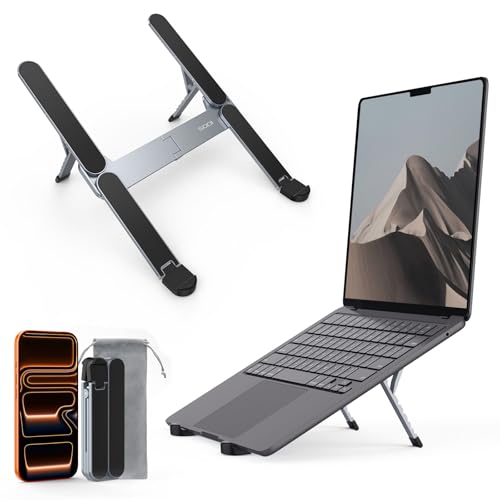
Best for: programmers who want the longest coverage on a travel stand Skip it if: you code on a 16-inch laptop with an external keyboard on top
The SODI 314 is the extreme end of "compact". Folded dimensions are 0.83 x 5 x 1.73 in, which is roughly the footprint of a passport, and it weighs 6.53 oz. SODI's marketing points out it weighs less than an iPhone 16 Pro, and that comparison lands: this is the only pick here that disappears into a jacket pocket rather than a laptop sleeve.
The 2-year manufacturer warranty is the longest published on any pick in this set, and it is also the only one with more than one seller listed, so availability is less brittle. Compatibility extends to 16-inch laptops. SODI describes the frame as an H-shape with silicone pads throughout and a spring-loaded arm that sets height in a second.
Where the SODI has to give ground is stability under load. A stand this small holding a 16-inch laptop is asking a lot of the base, and SODI's own copy stops short of publishing a supported weight figure the way BESIGN does. For coding on the built-in keyboard, that is fine. If you plan to rest an external keyboard on the tilted deck or lean on the palm rest during long typing bursts, this is not the pick.
Pros:
- 6.53 oz, the lightest in this set
- 2-year warranty, the longest published here
- Folds to a 5 in length, pocketable
- Compatible with laptops up to 16 in
- Three sellers listed, better availability than the others
Cons:
- Small base under a 16-inch laptop is a real concern
- No supported-weight figure published
- Priced in the premium band despite the small size
Fold-flat wedge or A-frame riser: which suits your workflow?
The best compact laptop stand for programmers depends on which of two coding weeks yours resembles.
The wedge week is mobile. Monday morning at home, Tuesday at a co-working desk, Wednesday at a client site, Thursday from a cafe with a bad wifi, Friday back home. In this week the stand has to disappear into a bag five times. Folded thickness under an inch is non-negotiable, and total weight under a pound is what you actually feel. The Tonmom 104S, the Gogoonike 103S and the SODI 314 all pass. The Tonmom wins because seven height levels beat six and because the lowest step, 2.78 in, is genuinely low.
The A-frame week is fixed. You sit at the same desk daily, you have an external keyboard, and you have room for a stand that stays put. The BESIGN LS03 was designed for this week. So was the OMOTON LA10, which adds rotation for shared reviews. In this week folded thickness stops mattering and rigidity starts to. Aluminium beats folded steel, and a 6 in lift with a keyboard underneath is the ergonomic answer.
The mistake is picking a wedge for the A-frame week or vice versa. A wedge on a fixed desk leaves your wrists at the wrong angle for six hours. An A-frame in a travel bag stays home.
Will a compact stand really hold a 15.6-inch laptop steady?
Every stand in this set claims 10 to 15.6-inch compatibility, and the SODI goes to 16 in. The listings all mention silicone pads and triangle or H-frame bracing. What none of them publishes clearly is the supported weight, except the BESIGN, which implies a working figure through its aluminium alloy claim.
In practice the question a programmer needs answered is different: does the stand stay put when you type hard. A wedge lifts the back of the laptop only, so the front rest and the desk friction do most of the work. A heavier laptop on a wedge with good silicone pads is often more stable than a lighter one on a wobbly A-frame. If your laptop is at the top of the compatibility range and you type with force, the BESIGN aluminium A-frame is the safest choice, and the SODI is the riskiest.
What the listings do not tell you about coding posture
A stand is half of the ergonomic answer. The listings talk about neck fatigue, and they are not wrong, but they do not tell you the rest.
- Screen at eye level means the top of the screen at eye level, not the middle. For a 15.6-inch laptop tilted back, that is roughly 6 in of lift with the laptop keyboard on the desk, or 4 in of lift with an external keyboard beneath.
- Your elbows want to sit at 90 degrees. No stand fixes that; the chair and the keyboard height do.
- The laptop keyboard is a compromise, not a workstation. A wedge makes an hour of coding tolerable. It does not make an eight-hour day healthy. If you code full-time, budget for an external keyboard and use one of these stands with it.
None of that appears in any product listing, and no stand in this category will solve it alone.
The verdict
The Tonmom 104S is the best compact laptop stand for programmers because it wins on the specification that actually matters, folded thickness, without losing on the one that comes second, height range. At 0.92 in folded and 0.57 lb, it travels invisibly. At seven levels from 2.78 to 6.5 in, it fits both a laptop-keyboard workflow and an external-keyboard one.
The pick flips in two cases. If your desk is fixed and you use an external keyboard, buy the BESIGN LS03 instead. It is the sturdier aluminium A-frame, it lifts the screen a full 6 in, and it publishes a 12-month warranty. If your work involves regular pair programming or screen-sharing across a desk, the OMOTON LA10 earns its higher price with a 360° rotation nothing else here offers. And if you want the longest coverage and the smallest folded footprint, the SODI 314 does something no other stand in this set does at 6.53 oz.
The Gogoonike 103S is the honest budget answer for a second bag. It is close enough to the Tonmom in shape that a spare makes sense at the price.
FAQ
Is a compact laptop stand worth it for programmers?
A compact laptop stand is worth it for programmers who type on a laptop for more than two hours a day. Lifting the screen 4 to 6 in reduces the neck angle that produces the low-grade ache most coders learn to ignore. The wedges in this guide fold under an inch and weigh under a pound, so the cost of carrying one is genuinely low.
What height should the screen sit at for coding?
The screen should sit so the top edge is at eye level when you look straight ahead. For a tilted 15.6-inch laptop, that usually lands 4 to 6 in of lift. The Tonmom 104S covers 2.78 to 6.5 in across seven steps, which lets you tune the exact position rather than accepting a single fixed lift like the BESIGN LS03 offers.
Tonmom 104S vs BESIGN LS03: which is better for a programmer?
Tonmom versus BESIGN comes down to whether you move. The Tonmom 104S wins for a programmer who hot-desks: 0.92 in folded, 0.57 lb, and seven height levels. The BESIGN LS03 wins for a programmer who codes at one desk with an external keyboard: an aluminium A-frame, a 6 in lift and a 12-month warranty. Pick the workflow first, then pick the stand.
Will these compact stands work with a 16-inch MacBook Pro?
For a 16-inch MacBook Pro, only the SODI 314 lists 16 in in its compatibility. The BESIGN LS03, the OMOTON LA10, the Tonmom 104S and the Gogoonike 103S all stop at 15.6 in in their published specs. A 16-inch laptop may still balance on the wider picks, but the safer answer is the SODI or, for a fixed desk, an A-frame rated for the size.
What is the most portable laptop stand for programmers in this guide?
The most portable pick is the SODI 314. It folds to 0.83 x 5 x 1.73 in and weighs 6.53 oz, small enough for a jacket pocket rather than a laptop sleeve. The Tonmom 104S is only slightly heavier at 0.57 lb but longer at 10.5 in folded, so it needs a sleeve pocket. Both beat the A-frame picks for travel by a wide margin.
Start with the workflow you actually have this week, not the one you wish you had. If your laptop moves, buy the Tonmom 104S first and try it for a fortnight before considering anything else. If your laptop lives on one desk and an external keyboard is already there, order the BESIGN LS03 and stop shopping. The wedge and the A-frame solve different problems, and the mistake most programmers make is treating them as interchangeable. The Tonmom is the right default because most coding weeks include at least one day away from the main desk, and a stand that lives in the bag is the only one that solves that day.